BIG PRINT

TrackTicks Big Print

It shows you, live on your chart, exactly where somebody just traded serious size.

Puts a marker on your chart the instant someone trades real size, whether that's one big order or a burst of smaller ones hitting the same price fast, and with Tick Replay enabled, mapped across your full chart history too.
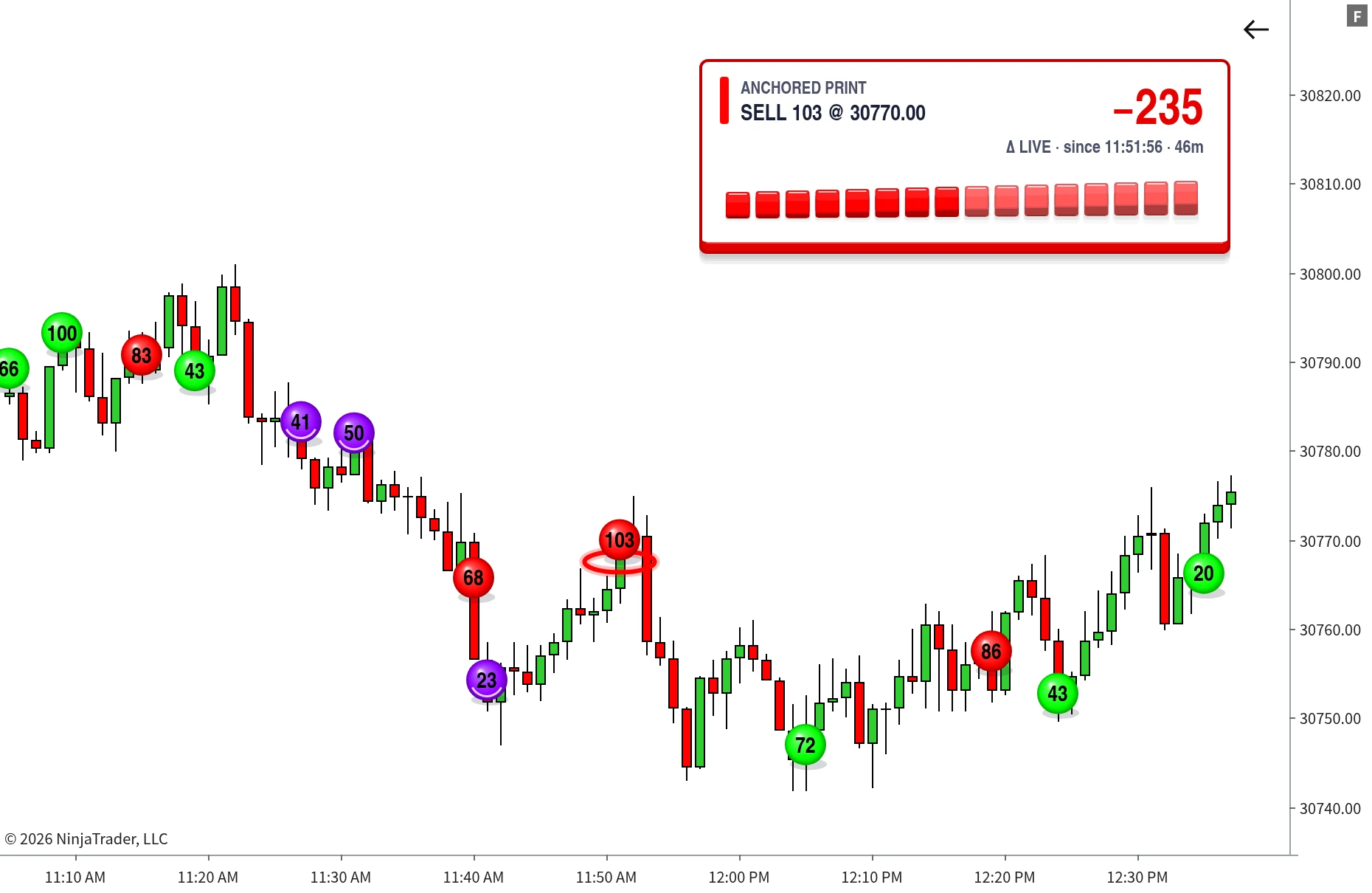
TrackTicks Big Print indicator flagging large trade prints on a NinjaTrader 8 chart
Setup

How It Works

Two numbers to set, then it reads the tape for you.

1

Set your thresholds

How big a single trade has to be, and how much same-side volume at one price counts as a burst. Run either on its own, or both together.

2

It marks every one

Qualifying prints appear the instant they happen, at the exact price they traded, sized and coloured by volume and side.

3

Click one to read the flow

Anchor a live delta count to any marker and watch whether that size gets absorbed or followed through.

Overview

What it does

Big Print watches every trade as it prints, and marks only the ones that matter.
Every trade, classified on arrivalEach print is judged the moment it lands, using the standard tick rule, and checked against your thresholds immediately. Nothing is sampled, batched or estimated after the fact.
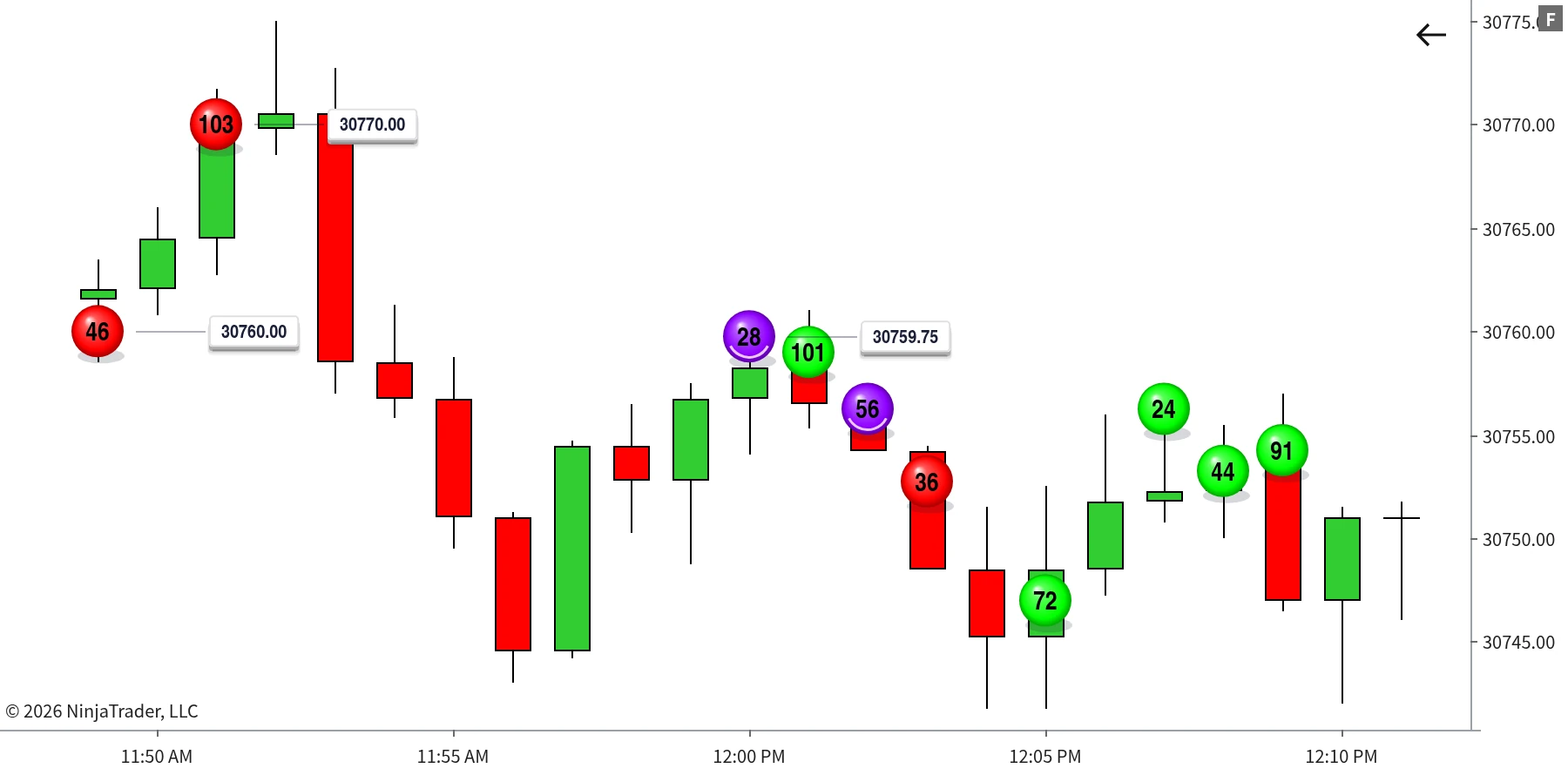
Marked at the exact priceWhen a print qualifies, the marker appears instantly at the price it traded, sized and coloured by volume and side, labelled with the real number.
Your history includedWith Tick Replay enabled it maps qualifying prints across the bars your chart has already loaded, so you never start on a blank chart.
Big Print markers placed at the exact price each qualifying trade happened
Each marker sits at the exact price the trade printed, labelled with its real volume. Colour shows which side was aggressive.
Across every chart, every time

Same call on every chart

Detection is unified across every chart open on an instrument, so a qualifying print never depends on the timeframe you happen to be watching.

Nothing counted twice

A trade big enough to qualify on its own is never also folded into a cluster total, so one real event never appears as two markers.

Your history, marked

With Tick Replay enabled, every trade across the bars already loaded is evaluated, so earlier size in the session is there when you open the chart.

Features

Two ways size shows up

One trader firing a big order, or a queue of smaller ones hammering the same price. Big Print tracks them as two separate things, so one never hides the other.

Individual Trades Print

One trade, big enough on its own

Any single trade at or above your chosen threshold prints an instant marker at the exact price it happened, labelled with its real volume.

Aggregated Trades Print

A burst of smaller ones at one price

Consecutive same-side trades landing at the exact same price are tracked live. The moment their combined volume clears your threshold, a separately styled marker fires.

Same controls, set separately
Both print types are styled independently, from the same set of controls
Circle sizeMin/max size limitsUniform sizing Buy colourSell colourOutline colourOutline width OpacityOn-chart volume textText sizeText colour Volume threshold

Set each one separately for individual prints and aggregated prints, so the two never look alike on your chart.

Signature Feature

Delta Since Big Print

Spotting the size is half of it. The other half is knowing what happened next.
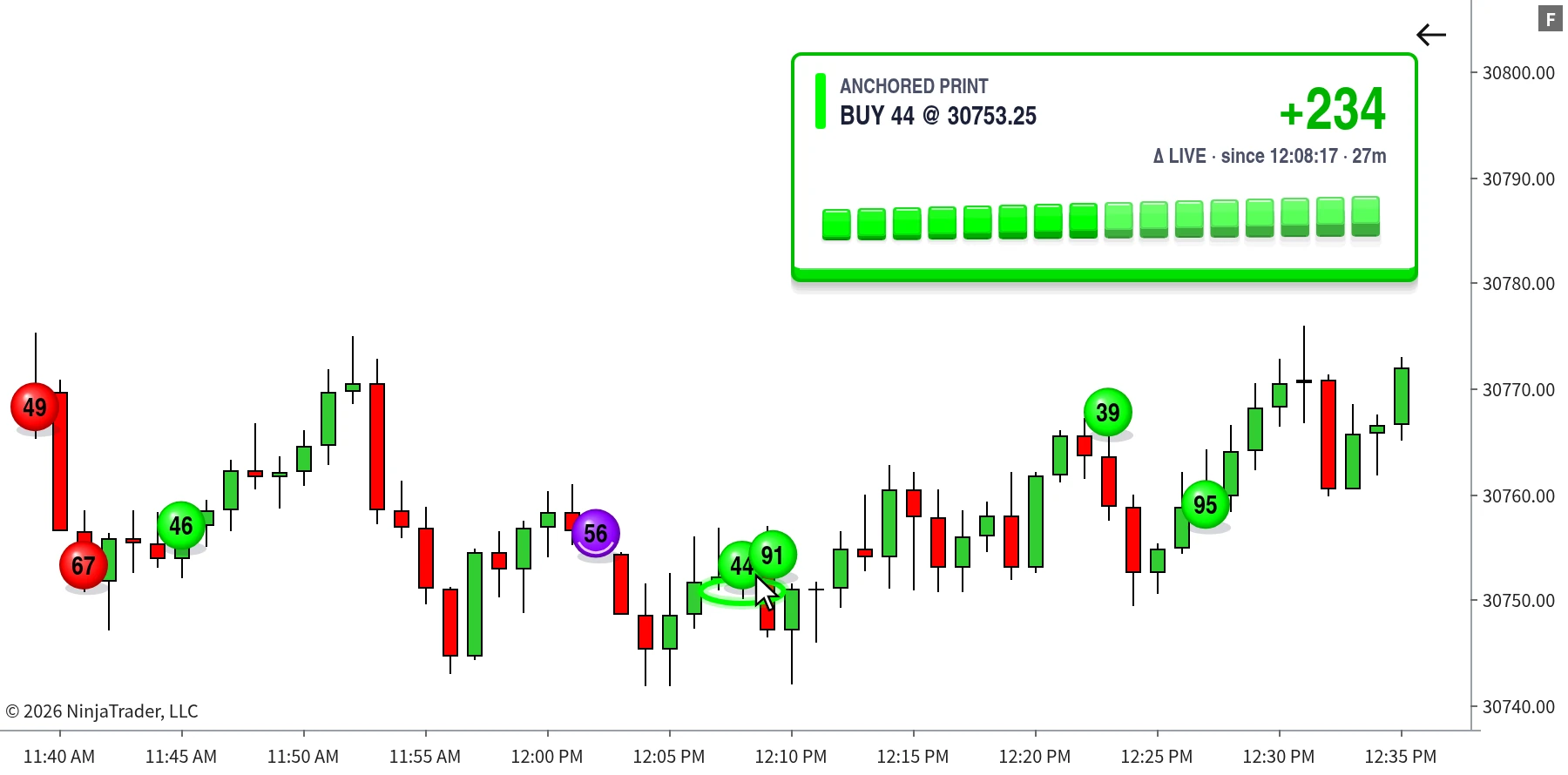
Click any marker to anchor itA live net-delta count locks to that exact print and keeps updating from there, for as long as you're watching it.
Replayed from real trade historyNot estimated forward from the moment you clicked. The count is built from the trades that actually went through.
Re-anchor whenever you wantClick a different marker at any time and the count jumps to it instantly, so your reference point follows the move.
Delta Since Big Print counter anchored to a marker, updating live
Anchored to a single buy print, the counter reads +234 delta since that trade, updating tick by tick.
How It's Built

Detected Live, Not Sampled

This is what separates Big Print from a simple threshold alert.
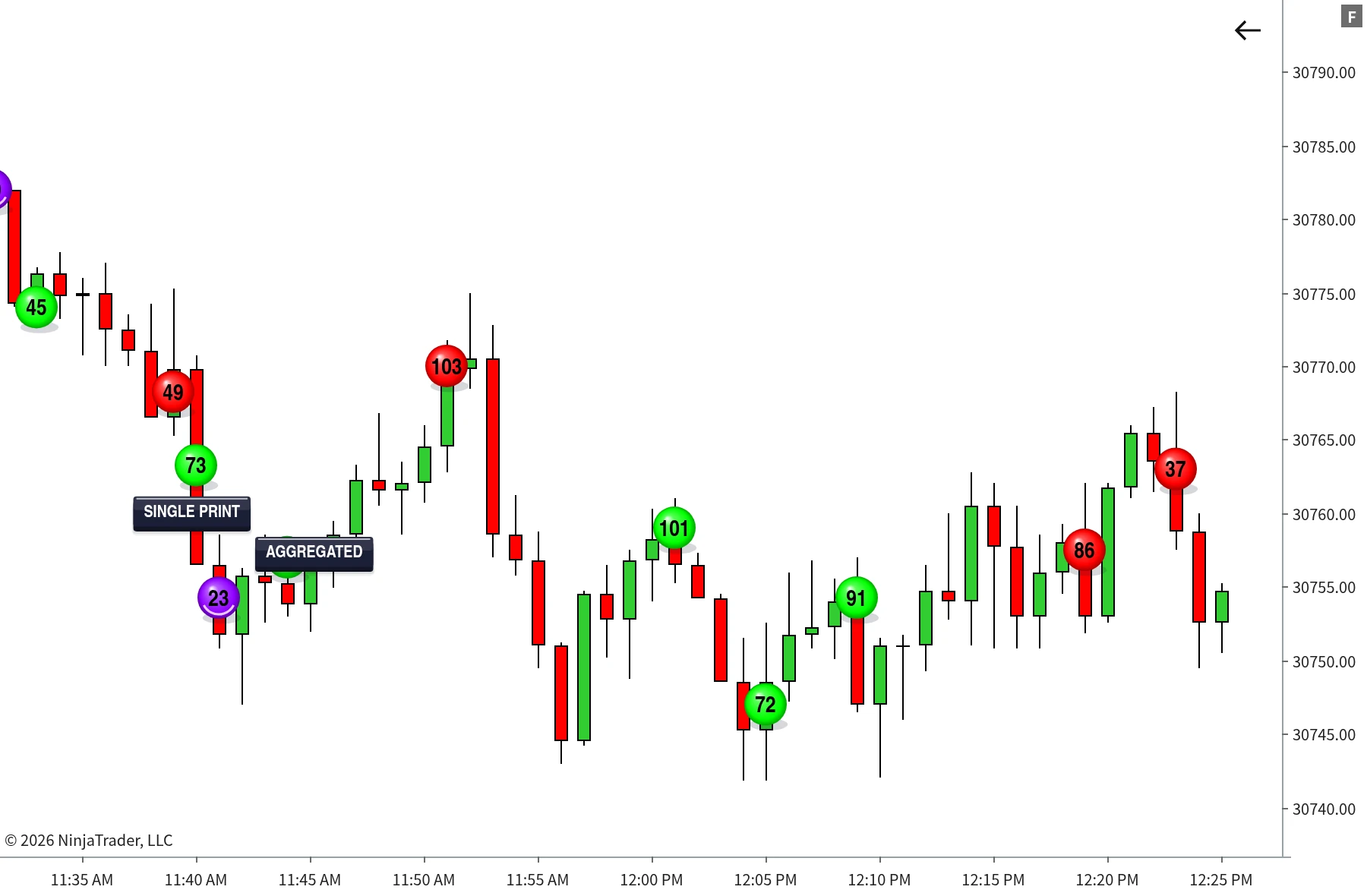
Single prints and aggregated clusters shown as separately styled markers
Single prints and aggregated clusters are styled separately, so sustained aggression at one level never gets confused with a single large order.
Classified the instant it arrivesAt or above the best ask counts as buyer-initiated, at or below the best bid counts as seller-initiated. Nothing grouped, nothing delayed.
Two detections, never mergedSingle large prints and same-side clusters are tracked as mutually exclusive events, so one real trade never appears twice on your chart.
Each chart keeps its own anchorDelta Since Big Print is tracked independently per chart, so clicking a marker on one chart never changes what any of the others are showing.
Built For

Who it's for

Big Print is built for traders working the tape intraday, on CME futures, who want to see real size the moment it lands rather than reconstruct it afterwards.

You trade intraday or scalpYou need to react to real order flow as it happens, not to an indicator that lags the move it's describing.
You want size marked at the price it tradedNot summarised into a bar, not averaged across a candle, but placed at the exact level the volume went through.
You care what happened nextKnowing size arrived is half of it. Anchoring delta to that print tells you whether it was absorbed or followed through, while it still matters.
You run several charts on one instrumentDetection is unified across every chart you have open, so a qualifying print never depends on which timeframe you happen to be looking at.
You want history marked tooWith Tick Replay enabled, prints are mapped across the bars your chart has already loaded, so earlier size in the session is visible immediately.
You're on NinjaTrader 8 with a live feedFull tick-by-tick accuracy needs a feed providing CME Level 1 data while the indicator is running and connected.
Requirements

Requirements

Runs on NinjaTrader 8. Full accuracy requires a live data feed providing CME Level 1 data while the indicator is running and connected, with Tick Replay enabled on the chart's data series. With Tick Replay on, Big Print detects and maps qualifying prints across the bars your chart currently has loaded, including history, not just from the moment it was attached forward; without it, NinjaTrader only sends live data, so detection only runs forward from when the indicator is attached. If your feed or instrument doesn't provide CME Level 1 data, trades still process tick by tick using a midpoint-based classification in place of a true bid/ask comparison.

Video

Full Walkthrough Video

Every setting explained, plus real chart examples of TrackTicks Big Print in use.

The Suite

The Full TrackTicks Suite

Big Print is one part of the full order flow suite. All four indicators are included in a single subscription.

New to order flow terms like Delta, Point of Control, or Footprint charts? See the glossary →

Disclaimer

TrackTicks Big Print is a charting and data-visualization tool. It does not generate buy or sell signals, does not predict future price movement, and is not a substitute for your own analysis, judgment, or risk management. Accuracy of the real-time bid/ask classification depends entirely on the completeness and timeliness of the data supplied by your NinjaTrader connection, data feed, and broker.

Trading futures carries a substantial risk of loss and is not suitable for everyone. See the full site disclaimer for complete terms.


Works With
TrackTicks Support Usually replies within 24 hours
Have a question about setup, billing, or an indicator? Send us an email and we'll get back to you.
Email Us support@trackticksindicators.com