MARKET DEPTH

TrackTicks Market Depth

It shows you, right beside price, where orders are resting in the book before they trade.

Draws the live Level 2 order book on the right of your chart, every bid and offer lined up with the price it sits at, sized to scale, with the biggest resting orders flagged the moment they show up.
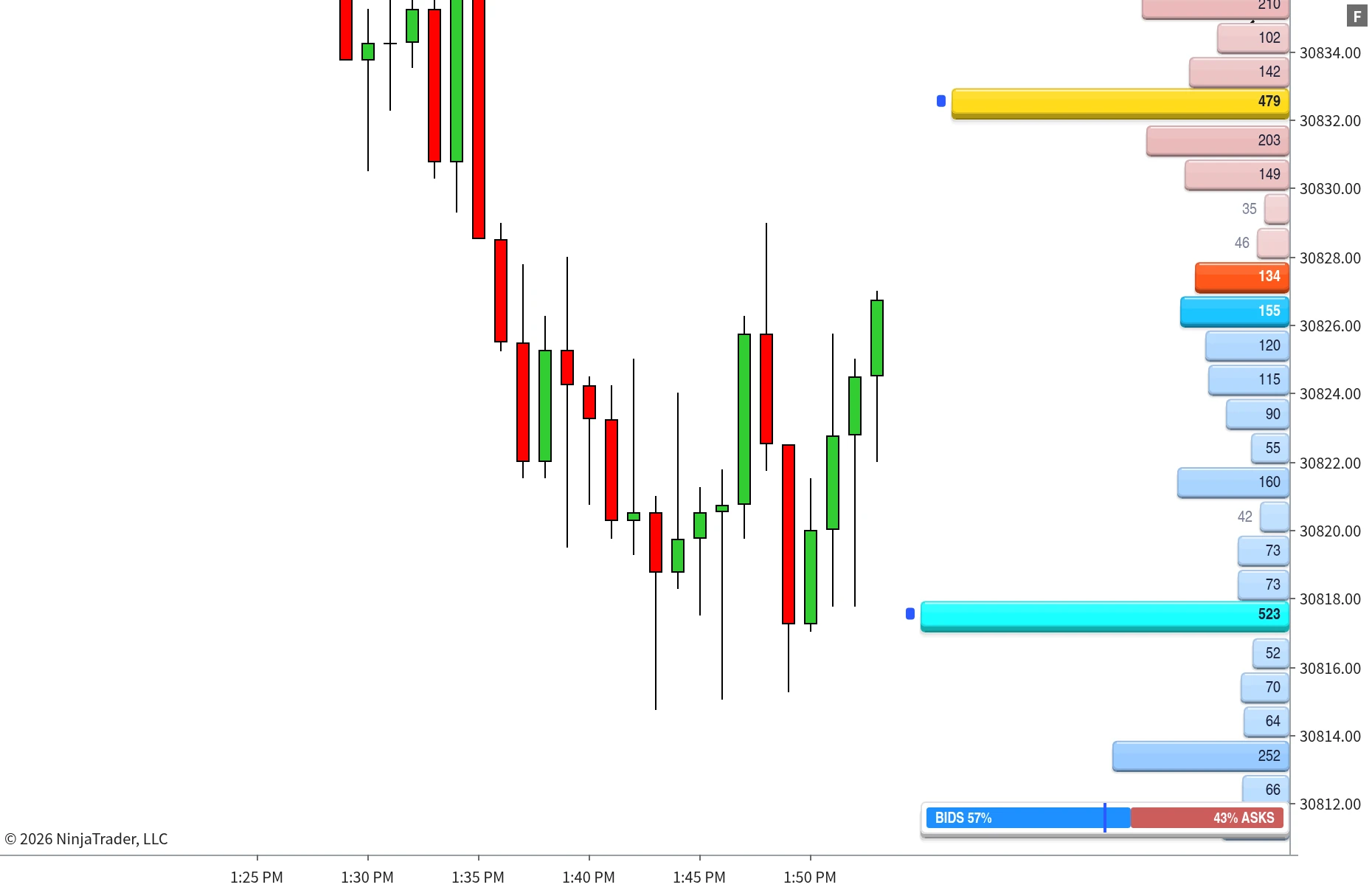
TrackTicks Market Depth live order book drawn beside price on a NinjaTrader 8 chart
Before you rely on it

Market Depth is only as deep as your data feed. It draws whatever order book your connection sends. NinjaTrader's standard Level 2 typically gives you around 20 price levels either side of the market, which is enough to see what's sitting right at the inside, but not the wider book. To get real value from this indicator you need a live data feed with access to the full order book.

Setup

How It Works

Add it to any chart with a Level 2 connection and the book appears beside your price axis.

1

Connect a depth feed

Market Depth listens to the live order book your connection sends, every add, change and pull, as it happens.

2

The book is drawn to price

Each level becomes a bar at its exact price, bids below the market and offers above, sized by the volume resting there.

3

Size stands out

The best bid and ask are always marked, and unusually large orders are flagged as walls so you see them without scanning.

Overview

What it does

Trades tell you what already happened. The book shows what's waiting, and Market Depth puts it on the same chart you trade from.
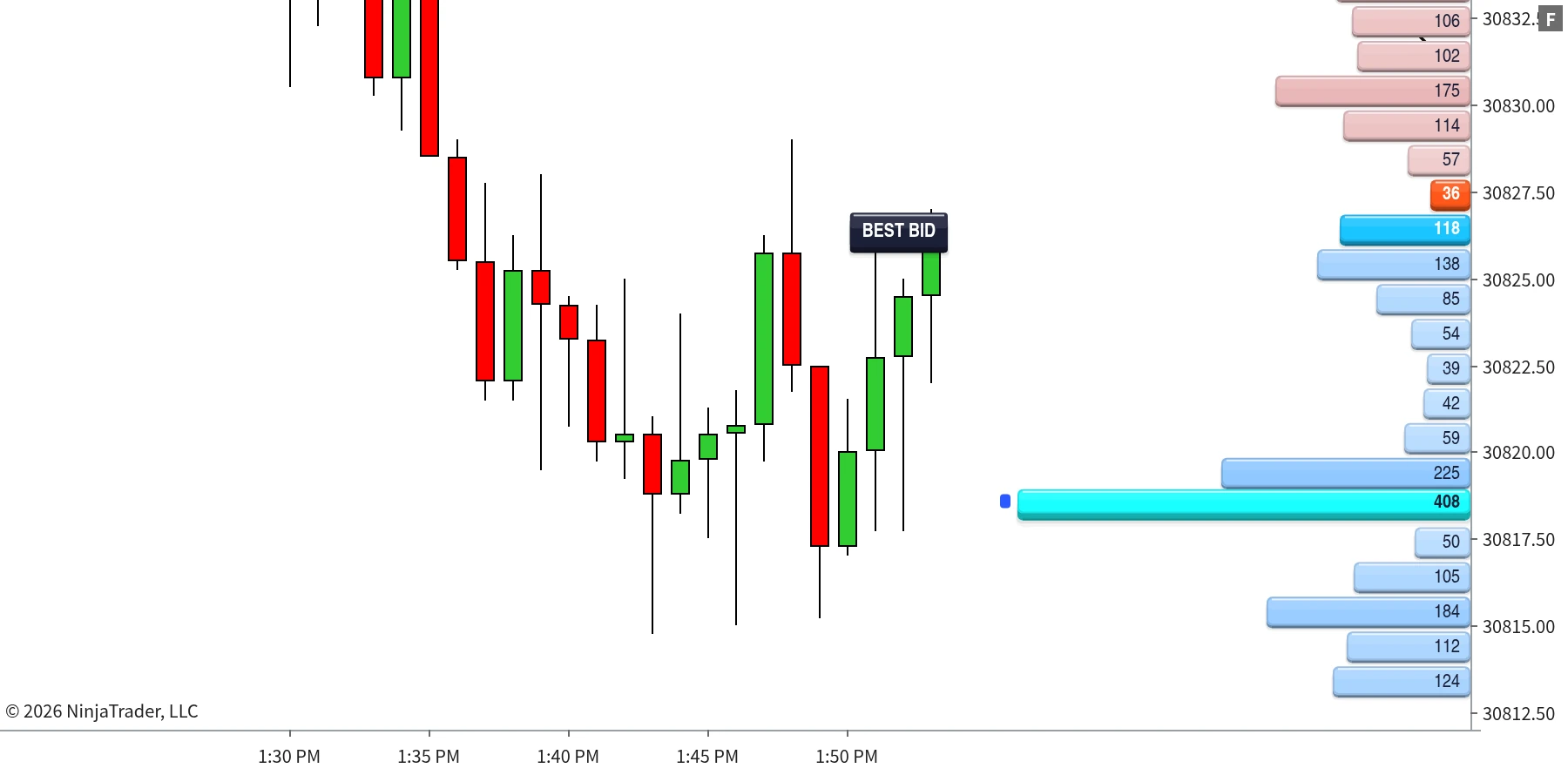
Lined up with your price axisEvery level sits at its real price on your chart, so resting liquidity reads directly against the candles, your levels and the rest of the suite.
The inside market, always markedThe best bid and best ask get their own colour, so the current spread is obvious at a glance even in a fast market.
Updated as the book changesOrders being added, pulled or filled are reflected as they happen, with a refresh throttle you can tune so a busy book never slows your chart.
Market Depth ladder with the best bid and ask highlighted beside NinjaTrader 8 candles
Bids below the market, offers above, with the best bid and ask in their own colours. A large bid further down stands out as a wall.
Built to read at a glance

Scaled your way

Size bars against the biggest level on screen, the biggest level in the whole book, or a fixed volume you choose.

Group ticks into zones

Merge several ticks into one level to read the book in bigger chunks, or keep it tick for tick when you want every price.

Filter the noise

Hide levels below a minimum volume, so only the size you care about is drawn.

Features

Walls, flagged the moment they appear

A large resting order can hold price or pull away right before it's reached. Either way, you want to know it's there.
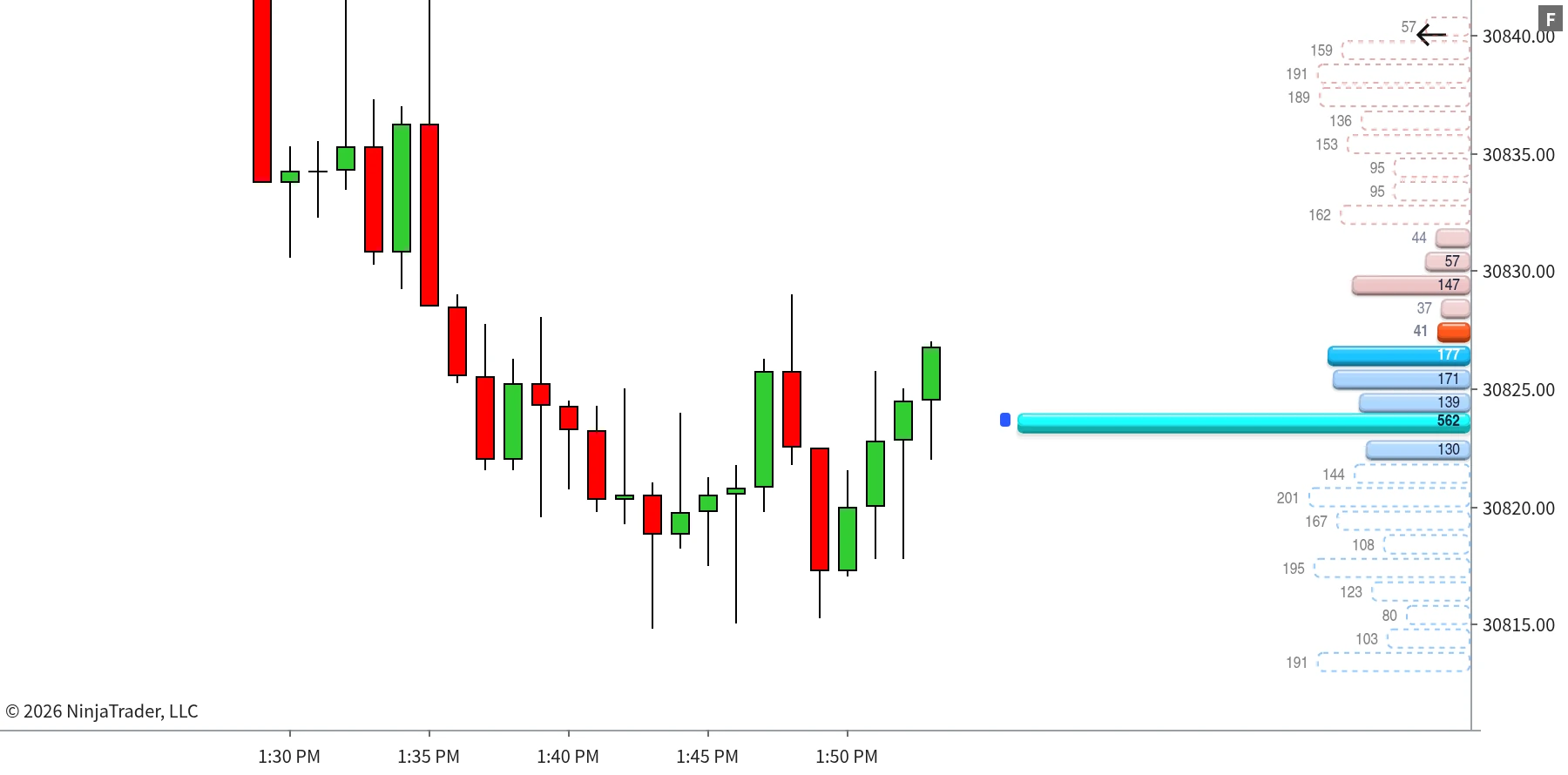
Market Depth large bid wall flagged, with levels beyond the feed's depth remembered as dashed outlines
A 562-lot bid flagged as a wall. The dashed outlines above and below are remembered levels from beyond the feed's current depth.
Large levels highlightedSet a fixed volume, or a multiple of the average level size, and anything above it is raised, recoloured and marked with a flag beside the bar.
Levels beyond the feed, rememberedWhen price moves and a level drops outside the depth your feed sends, it can stay on the chart as a dashed outline instead of vanishing, with an optional expiry time.
Honest about what's liveRemembered levels are always drawn differently from live ones, so you never mistake an old reading for an order that's there right now.
Fully adjustable
Every part of the ladder is yours to set
Levels per sideTicks per levelBar widthBar directionRight offsetLevel gap Bar scalingMin volume to showBid colourAsk colourLevel outlines Best bid/ask highlightLarge level thresholdRemembered levelsVolume numbersBalance bar

Numbers are shown as whole contracts, exactly as the book reports them.

Signature Feature

Which side is heavier

A long ladder of numbers is hard to total in your head. The balance bar does it for you.
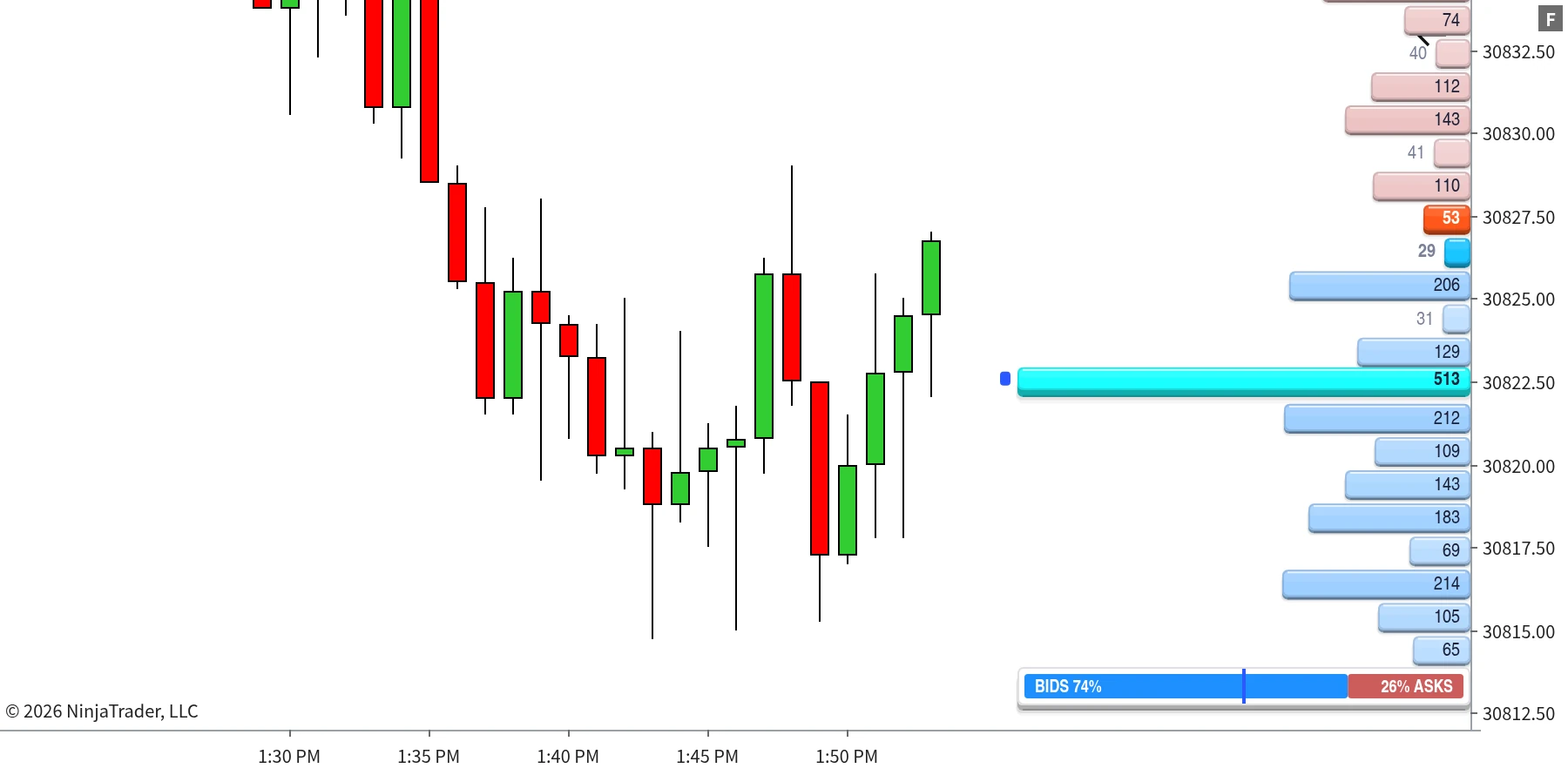
Bids against asks, in one barTotal resting bid volume against total resting ask volume across the levels in view, shown as a live percentage split.
Updates with the bookAs orders are added and pulled, the split moves with them, so a book that's quietly stacking up on one side doesn't slip past you.
Out of the wayIt sits at the foot of the ladder, and you can switch it off if you only want the levels.
Market Depth balance bar showing the bid versus ask split of the visible order book
With a large bid resting below the market, the visible book reads 74% bids to 26% asks.
Built For

Who it's for

Market Depth is built for intraday futures traders who want the resting book on the same chart as price, instead of in a separate DOM window.

You watch where size is restingLarge bids and offers near the market are flagged as they appear, so you see potential support, resistance and spoofed size building in real time.
You'd rather not split your screenThe book lines up with your chart's price axis, so you don't have to match prices between a DOM and a chart by eye.
You pair it with the tapeRun it with Big Print and Stacked Imbalance to see resting size and aggressive size on one chart.
You scalp the inside marketThe best bid and ask are always marked, and the balance bar gives a quick read on which side of the book is heavier.
You have a full-depth feedYou're connected to a live feed that sends the whole order book, not just the standard 20 or so levels either side.
You're on NinjaTrader 8It runs on any NinjaTrader 8 chart with a live Level 2 market depth connection.
Requirements

Requirements

Runs on NinjaTrader 8 and requires a live data feed providing Level 2 market depth while the indicator is running and connected. Market Depth can only draw the levels your feed sends: NinjaTrader's standard Level 2 typically provides around 20 price levels either side of the market, so for the full picture you need a feed with access to the whole order book. The order book is live-only data, so NinjaTrader doesn't keep it for historical bars and Tick Replay doesn't apply: the ladder builds from the moment the indicator is attached and connected. The remembered-levels option can keep levels on the chart after they move beyond your feed's depth, but they are always drawn as outlines, never as live orders.

The Suite

The Full TrackTicks Suite

Market Depth is one part of the full order flow suite. All six indicators are included in a single subscription.

New to order flow terms like Delta, Point of Control, or Footprint charts? See the glossary →

Disclaimer

TrackTicks Market Depth is a charting and data-visualization tool. It does not generate buy or sell signals, does not predict future price movement, and is not a substitute for your own analysis, judgment, or risk management. Resting orders can be modified or cancelled at any time before they trade, and the levels shown depend entirely on the completeness, depth and timeliness of the data supplied by your NinjaTrader connection, data feed, and broker.

Trading futures carries a substantial risk of loss and is not suitable for everyone. See the full site disclaimer for complete terms.


Works With
TrackTicks Support Usually replies within 24 hours
Have a question about setup, billing, or an indicator? Send us an email and we'll get back to you.
Email Us support@trackticksindicators.com