STACKED IMBALANCE

TrackTicks Stacked Imbalance

It shows you, live on your chart, where one side overwhelmed the other at several prices in a row.

Reads every trade inside every candle, finds runs of consecutive bid/ask imbalances as they form, and marks each one as a zone that extends forward until price deals with it. Runs on a regular candlestick chart, no footprint bars needed.
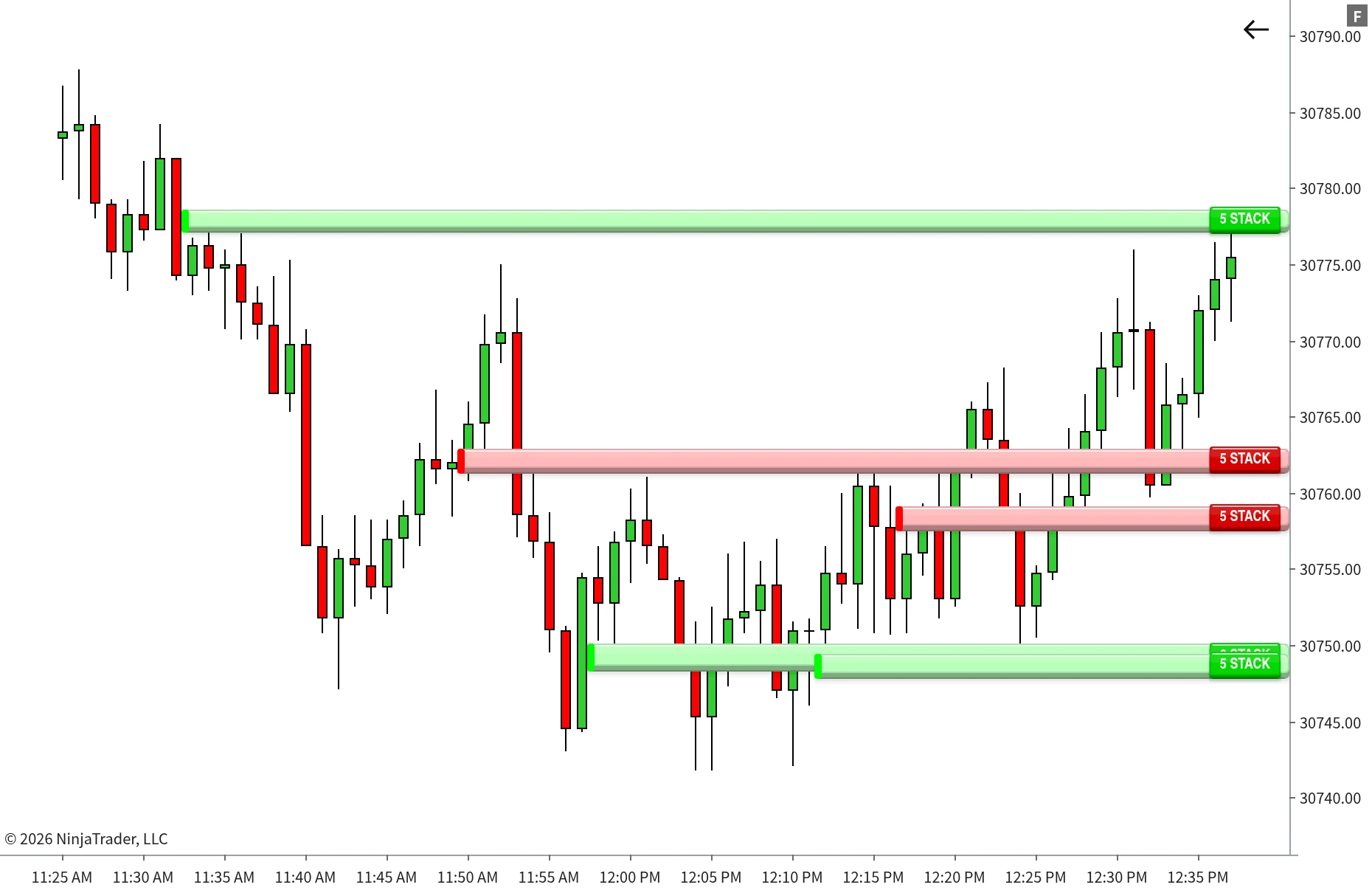
TrackTicks Stacked Imbalance zones extending from stacked buying and selling on a NinjaTrader 8 chart
Setup

How It Works

Three numbers decide what counts. Everything after that is automatic.

1

Set what counts

Pick the imbalance ratio, how many levels in a row make a stack, and the minimum volume a level needs before it's considered.

2

Stacks become zones

The moment a candle builds a qualifying stack, a zone is drawn across those exact prices and starts extending to the right.

3

Price decides when it ends

Each zone stays live until price retests it, closes through it, or indefinitely, whichever rule you choose.

Overview

What it does

One imbalance is noise. Several stacked on top of each other is one side leaning on the market, level after level.
Built from every trade in the candleEach print is classified as it arrives, buyer or seller initiated, and added to that candle's volume at its exact price. Nothing is sampled or estimated from bar totals.
Compared the way the tape readsBuying is checked diagonally, the ask at one price against the bid one tick below. Selling is the mirror image. That's the standard footprint comparison, done for you on every level.
Only real runs get markedA zone appears only when enough imbalanced prices line up consecutively on the same side, so one lopsided level on its own never clutters your chart.
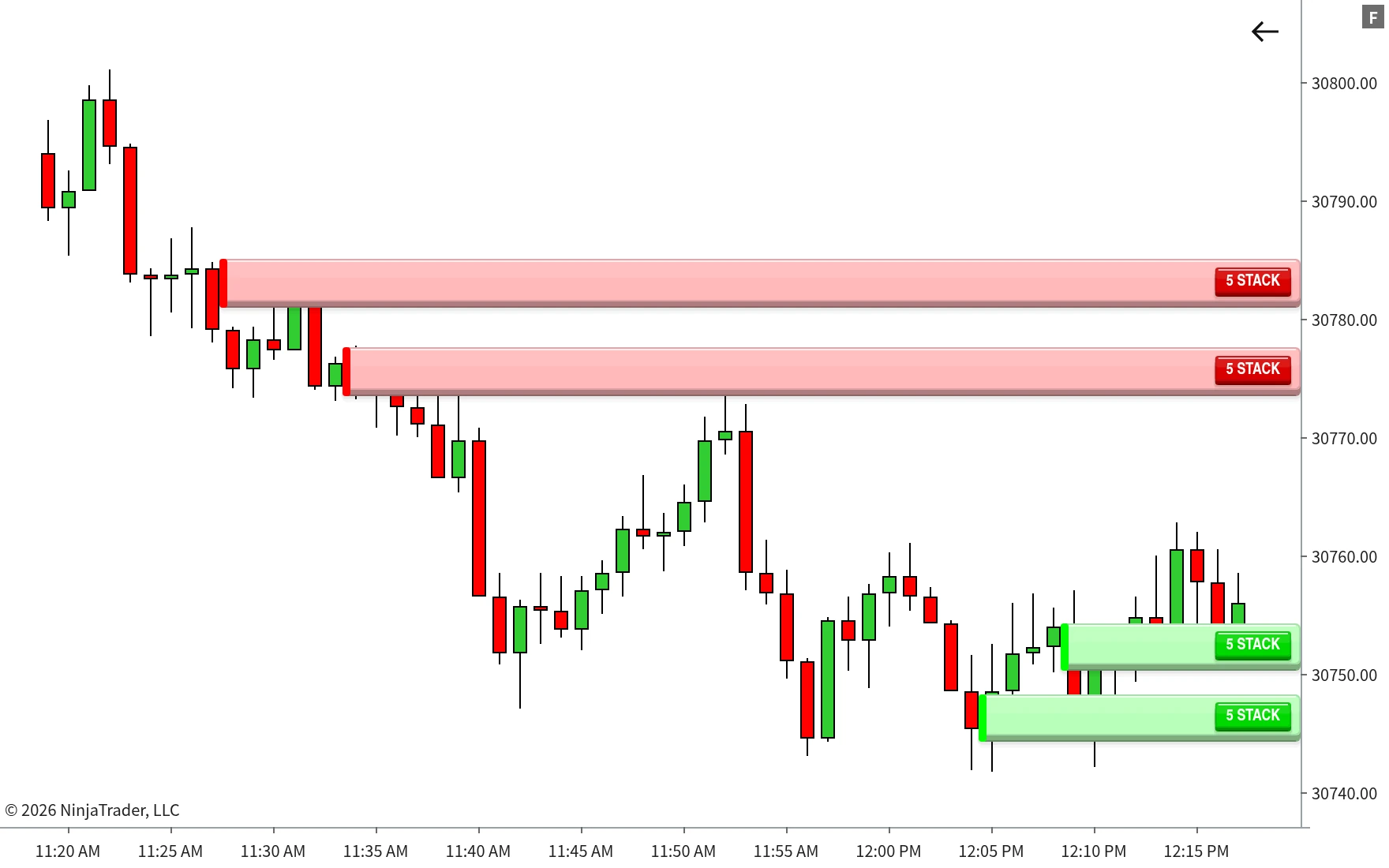
Buying and selling Stacked Imbalance zones marked on a NinjaTrader 8 candlestick chart
Buying and selling stacks marked as zones the moment they form, each one starting at the candle that built it.
Checked on every level, every candle

Your ratio, your rules

The imbalance ratio is yours to set, 350% by default, alongside the stack length and minimum volume per level.

Zeros handled honestly

An empty opposite side can count as an imbalance if you want it to, and it's treated as one contract, so your ratio still applies instead of every zero passing automatically.

No footprint chart needed

It overlays a regular candlestick chart and runs on its own tick engine, the same one behind Big Print and Profile+.

Features

Zones that know when they're done

A stack matters until the market comes back and deals with it. Pick how each zone should end, and how it should look while it's live.
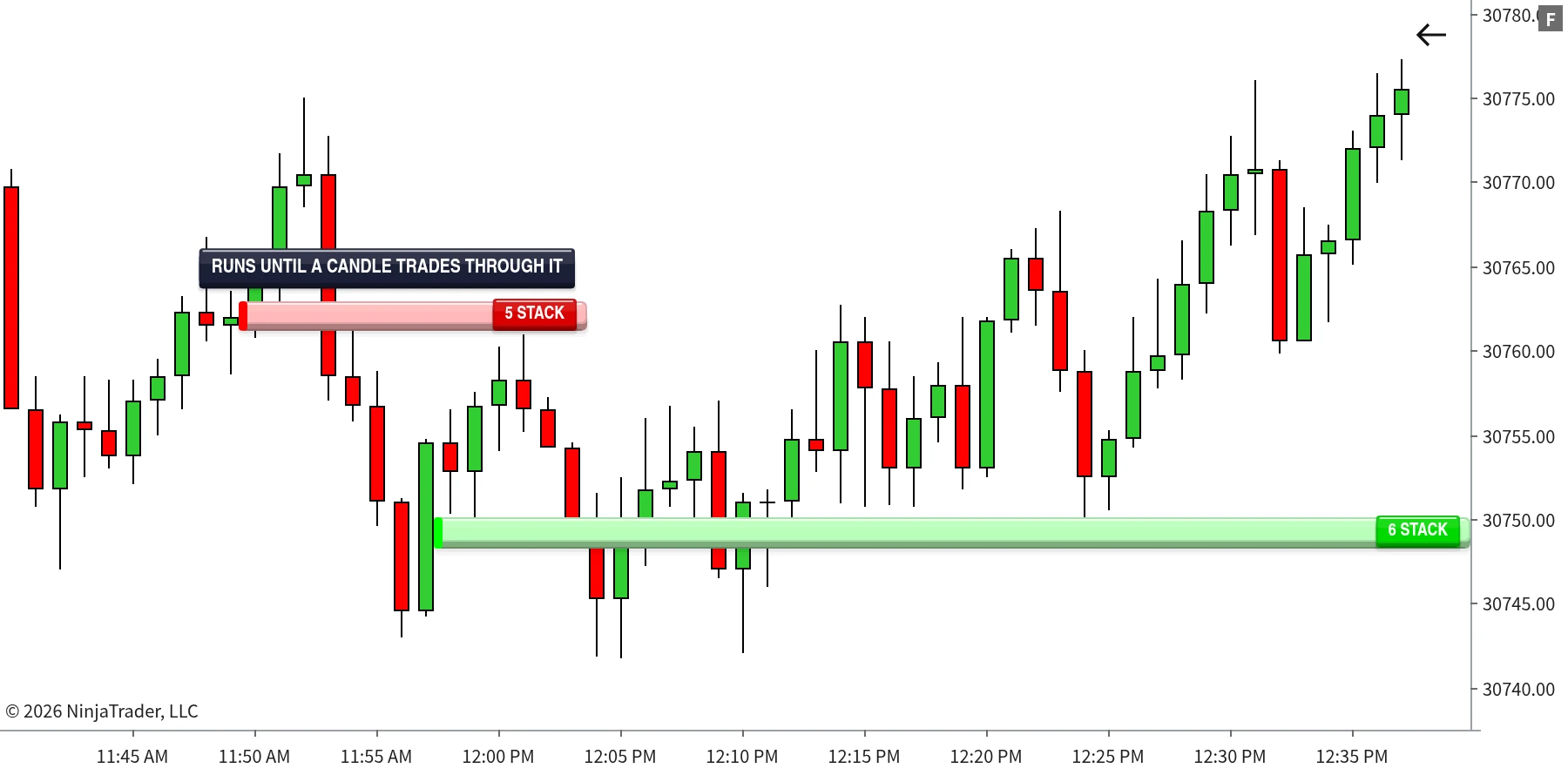
Stacked Imbalance zones extending right until price trades back through them
A selling stack ends as soon as a later candle trades back into it, while the buying stack below keeps extending, untouched.
Until Candle Retests ZonePrice has to move away first. The zone ends when a later candle trades back into it.
Until Candle Close Above/Below ZoneA buying zone ends on a close below it, a selling zone on a close above it. Wicks through are allowed.
Zone Visual IndefiniteThe zone keeps extending up to your maximum length, and stops at the first later candle that overlaps its prices instead of drawing through price action.
A grace period for fast marketsFor the first few minutes after a stack forms, 3 by default, a retest or close through doesn't remove it, so stacks that get tested straight away aren't lost.
Three ways to draw them
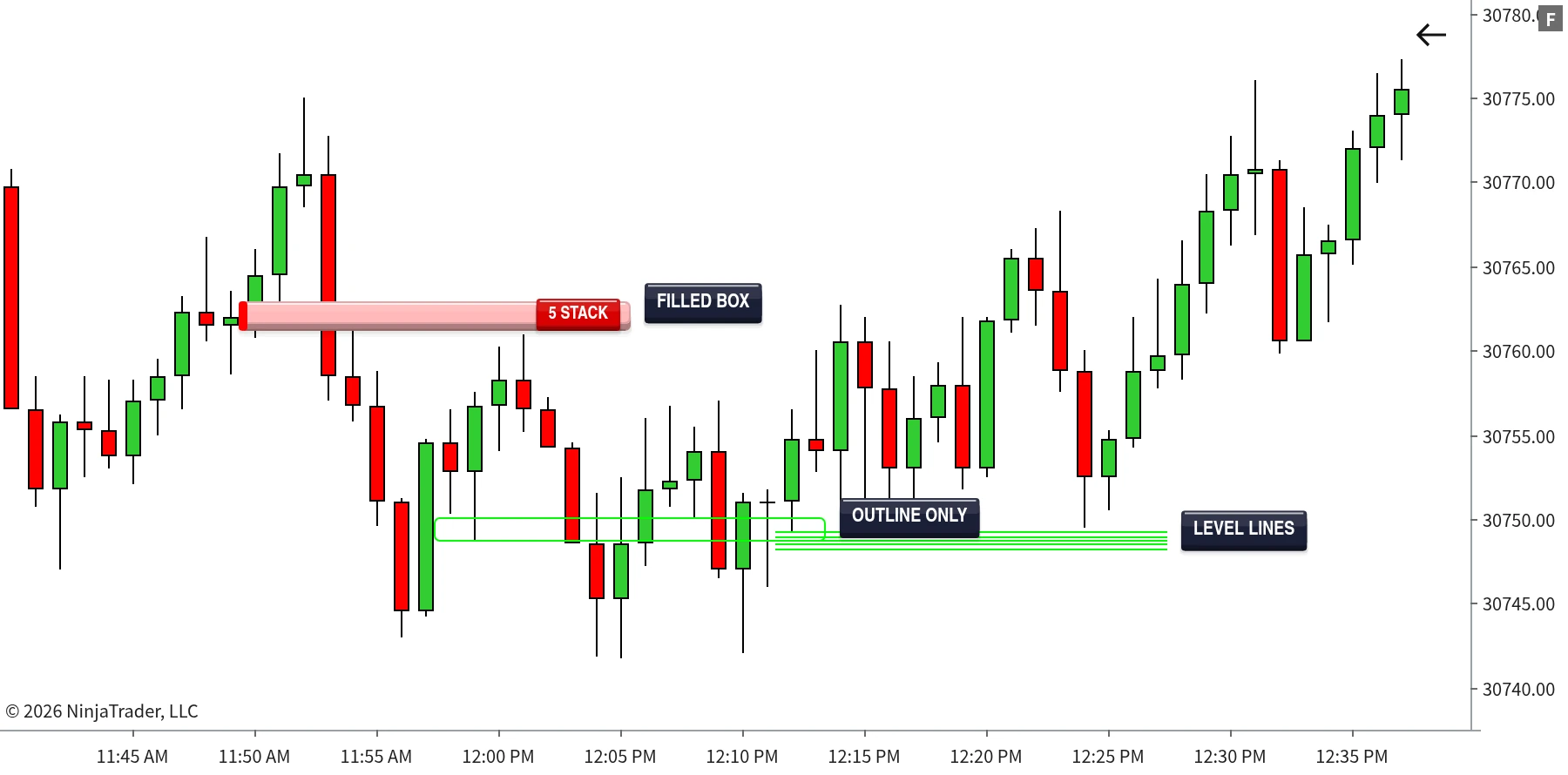
Filled BoxA translucent block across the stacked prices. Where zones overlap, the fills layer into a darker band, showing where the heaviest activity sat.
Outline OnlyJust the edges of the zone, for a cleaner chart when you're running several indicators at once.
Level LinesOne line per stacked price, at the thickness you choose, so every imbalanced level stays individually visible.
Stacked Imbalance zones drawn as a filled box, outline only and level lines
The same stacks drawn as a filled box, an outline, and individual level lines.
Fully adjustable
Detection and drawing are set separately, so the look never changes what gets found
Imbalance ratioStacked levelsMin volume per levelCount zero as imbalance Display zone modeGrace periodZone styleZone lengthZone width Buy colourSell colourZone opacityLine thicknessNumber size

Zone length and width only change how a zone is drawn, never which stacks are detected.

Signature Feature

The numbers, right where you need them

Zoom in on any zone and the tape behind it is right there. No switching to a footprint chart to check the maths.
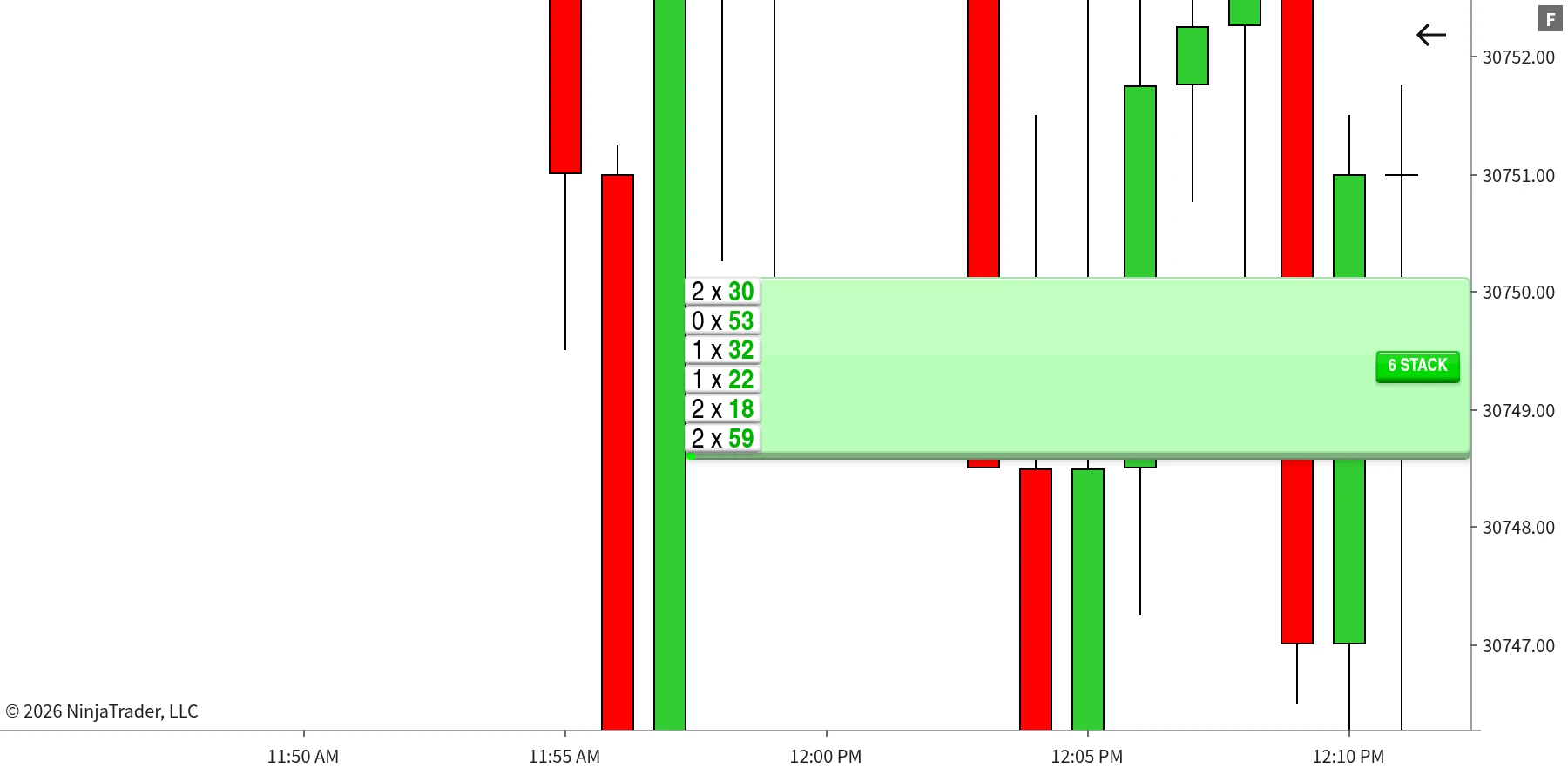
Bid x ask numbers shown inside a Stacked Imbalance zone after zooming the price axis
Six stacked buying levels, each shown as bid × ask with the dominant ask volume in bold colour.
Appears as you zoomStretch the price axis and bid × ask numbers fade in beside the candle, inside the zone. Zoom back out and they get out of the way.
The winning side stands outThe imbalanced side of every level, the ask on a buying stack or the bid on a selling stack, is highlighted so you can read the stack at a glance.
Matches the rest of the suiteVolume is stored per price the same way Profile+ does it, so the numbers agree across every TrackTicks indicator on your chart.
Built For

Who it's for

Stacked Imbalance is built for intraday futures traders who read aggression at the price level, and want the obvious runs found for them while they watch everything else.

You use stacked imbalances as levelsSupport and resistance built from real one-sided aggression, marked the moment it happens and kept on the chart until price deals with it.
You don't want to live on a footprint chartKeep your regular candlestick chart and let the indicator do the level-by-level comparison in the background.
You want to verify, not trustZoom in and every stacked level shows its actual bid and ask volume, so you can check exactly why a zone was drawn.
You trade fast opens and newsThe grace period keeps stacks that get retested straight away, instead of losing them the moment the market wobbles.
You want history marked tooWith Tick Replay enabled, stacks are found across the bars your chart has already loaded, not just from the moment you add the indicator.
You're on NinjaTrader 8 with a live feedFull tick-by-tick accuracy needs a feed providing CME Level 1 data while the indicator is running and connected.
Requirements

Requirements

Runs on NinjaTrader 8, on a regular candlestick chart. Full accuracy requires a live data feed providing CME Level 1 data while the indicator is running and connected, with Tick Replay enabled on the chart's data series. With Tick Replay on, Stacked Imbalance builds every candle your chart has loaded from real tick data, so stacks are found across your history, not just from the moment it was attached; without it, NinjaTrader only sends live data, so detection only runs forward from when the indicator is attached. If your feed or instrument doesn't provide CME Level 1 data, trades still process tick by tick using a midpoint-based classification in place of a true bid/ask comparison.

The Suite

The Full TrackTicks Suite

Stacked Imbalance is one part of the full order flow suite. All six indicators are included in a single subscription.

New to order flow terms like Delta, Point of Control, or Footprint charts? See the glossary →

Disclaimer

TrackTicks Stacked Imbalance is a charting and data-visualization tool. It does not generate buy or sell signals, does not predict future price movement, and is not a substitute for your own analysis, judgment, or risk management. Accuracy of the real-time bid/ask classification depends entirely on the completeness and timeliness of the data supplied by your NinjaTrader connection, data feed, and broker.

Trading futures carries a substantial risk of loss and is not suitable for everyone. See the full site disclaimer for complete terms.


Works With
TrackTicks Support Usually replies within 24 hours
Have a question about setup, billing, or an indicator? Send us an email and we'll get back to you.
Email Us support@trackticksindicators.com